Create a QR code / preset
A preset is a saved set of hidden parameters attached to a feedback survey. Use presets to generate a unique QR code and link for a specific table, server, or event, so you know where each response came from without asking the customer.
-
Open the survey and go to Presets.
-
Select New Preset and give it a name that identifies the context — for example, “Table 12” or “Server: Alex”.
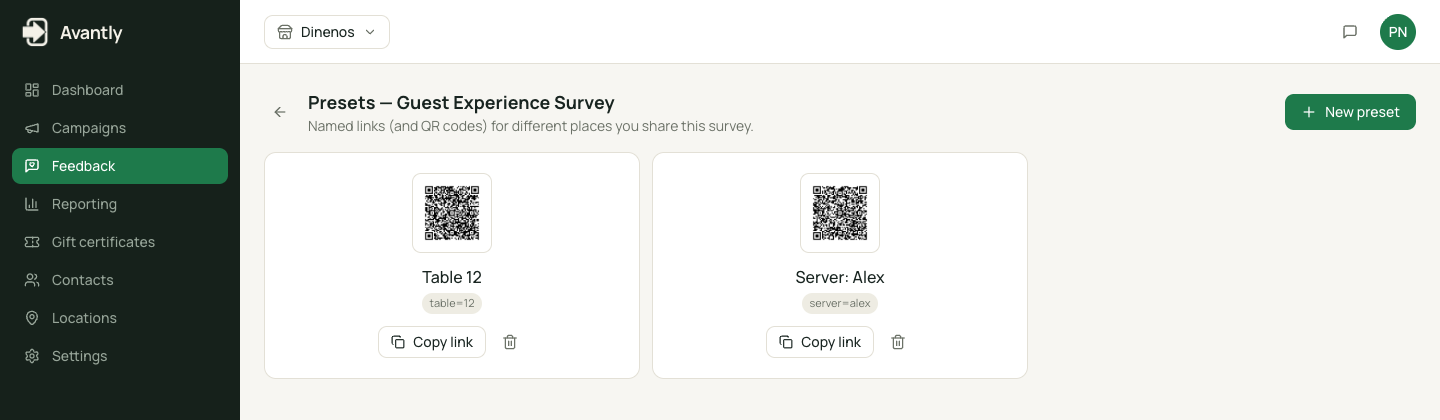
Feedback survey presets -
Save. Avantly generates a unique link and QR code for this preset.
-
Print or display the QR code where relevant — on a table tent, a receipt, or a name badge.
Every response submitted through a preset’s link carries its hidden parameters automatically, so you can filter and report on feedback by table, server, or event later.